Automated Order Process Solutions for B2B & Retail
Transform your sales pipelines with a comprehensive, enterprise-grade automated order process. Eliminate double-entry, bypass manual bottlenecks, sync stock in real time, and scale fulfillment with robust database replication middleware.
Authored by JT Smith Team • Updated on September 28, 2026
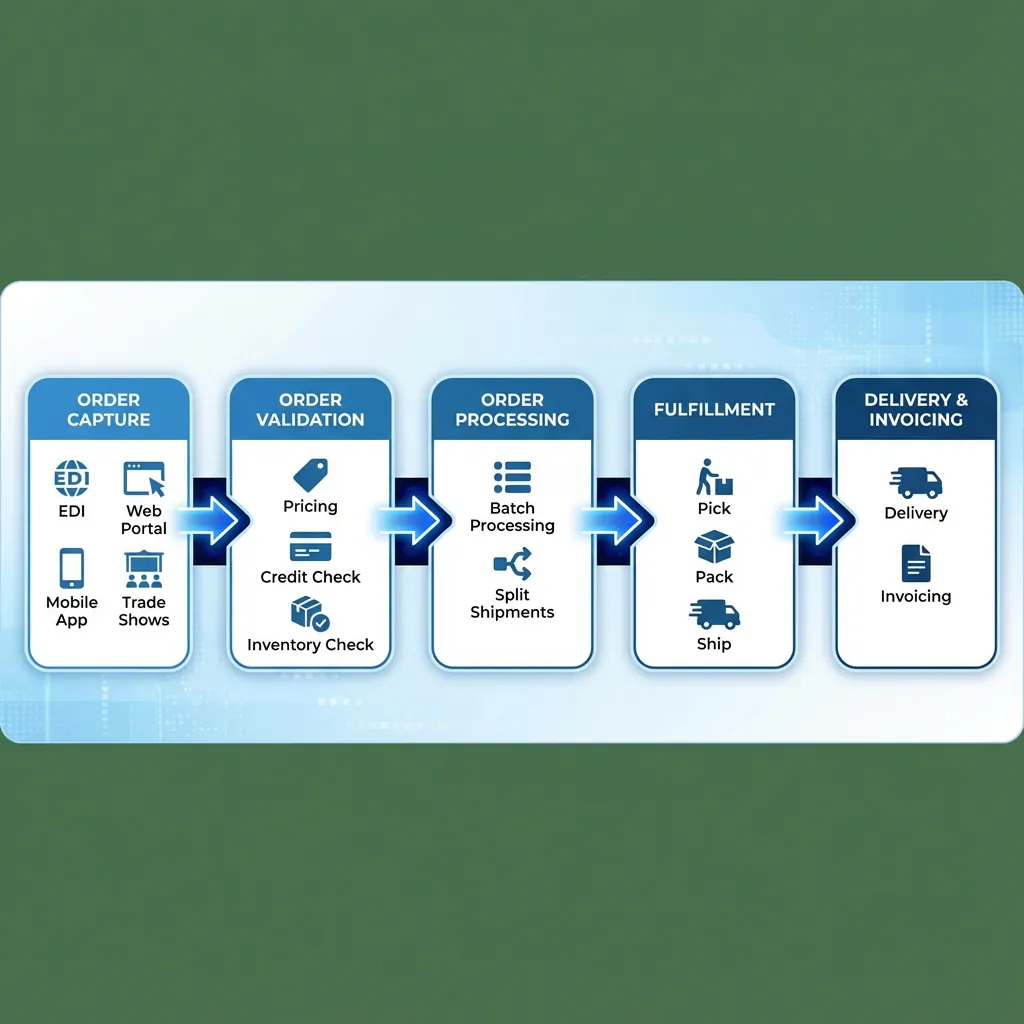
What is an automated order process?
An automated order process is one where software, not staff, carries each order from capture to fulfillment. The order is entered once, priced from the buyer's contract and any active deals, sent to the ERP and confirmed, with no re-keying. People step in only when an order needs a decision.
How an order flows, step by step
- Capture the order. The buyer, a sales rep or a show vendor enters it once, in an ordering app, a web portal or another sales channel.
- Validate pricing and items. The system checks each item and applies the buyer's contract pricing and any active deals, such as show specials.
- Sync to the ERP. The order is written to the ERP with no re-keying, so accounting, purchasing and inventory all work from the same order.
- Confirm. The buyer gets a confirmation of what was ordered and at what price.
- Fulfill. The warehouse picks, packs and ships the order, and the ERP invoices it.
- Report. Order totals by item, vendor or rep show up in reports as orders arrive.
showPRO™ runs this flow for trade show and B2B orders. Buyers and reps scan or pick items in the app or web portal, contract pricing and show deals are applied as the order is built, orders sync to the distributor's ERP, and hosts and vendors see real-time reports during the show. To see where order taking sits next to the ERP and warehouse system, read our guide to wholesale distributor software.
Why it matters
In high-volume B2B distribution and modern retail ecosystems, relying on manual steps to log, verify, and route purchases introduces substantial risk. By replacing keyboard inputs and spreadsheet uploads with automated transaction pipelines, organizations achieve rapid shipping times, minimize order correction costs, and maintain clean database records.
Historically, businesses processed orders in rigid batch cycles, leading to data delays and inventory discrepancies. Today, real-time webhooks, event-driven microservices, and specialized middleware allow sales platforms to immediately notify inventory databases and warehouse queues when a transaction is completed. For instance, when an order is completed via a mobile catalog app on a trade show floor, the system instantly logs the sale, claims matching inventory in the database, and schedules shipment details.
Furthermore, automating the order flow guarantees transactional consistency. Standard B2B sales involve complex factors such as custom contract pricing, tiered volume discounts, customer-specific credit lines, and multi-warehouse split shipping. An automated system runs immediate validation checks against these B2B rules, ensuring orders are approved, paid for, and routed without a sales representative having to verify records manually.
Core Architectural Components of Order Automation
A robust, automated system relies on several core components working in unison to process data, manage inventory, and secure revenue.
Multi-Channel Order Capture
Aggregate purchase records from online stores, B2B customer portals, trade show ordering apps, and EDI document streams. Standardize diverse payloads into a unified database format instantly.
B2B Credit & Payment Check
Authorize credit card payments using secure tokenization and check buyer credit limits against ERP records, preventing order fulfillment if a client has outstanding overdue balances.
Real-Time Inventory Allocation
Soft-allocate inventory at the moment of checkout to prevent overselling. Database concurrency controls lock rows to guarantee stock is reserved for active orders.
Intelligent Order Routing
Calculate the distance between the customer address and multiple distribution hubs. Automatically route orders to the closest warehouse to minimize shipping fees and transit times.
Automated Communication
Send automated transactional notifications (email and SMS) for order confirmation, shipping tracker updates, and delivery alerts to build customer trust and loyalty.
Exception & Error Management
Route address validation errors, fraud risk alerts, and inventory deficits into an administrative queue for human review, allowing standard transactions to flow without delay.
Deep Technical Integration: Connecting Web Storefronts to Legacy ERPs
The primary bottleneck in most order processing systems is the bridge between modern web frontends (React SPAs, Shopify, custom B2B portals) and legacy Enterprise Resource Planning (ERP) systems like NetSuite, SAP, or Sage. This bridge is typically managed by custom API middleware or Integration Platform as a Service (iPaaS) solutions.
Order Validation & Synchronization Middleware
Below is a logic blueprint illustrating how incoming order JSON payloads are captured, cleaned, checked for duplication (idempotency), validated for inventory, and posted to the ERP database. This code structure prevents duplicate order entries even under unstable mobile network conditions during trade shows.
async function handleIncomingOrder(orderPayload) {
  // 1. Idempotency Check: Prevent duplicate order processing
  const existingOrder = await db.orders.find({ transactionId: orderPayload.id });
  if (existingOrder) {
    return { status: "success", message: "Duplicate block active. Order already logged.", orderId: existingOrder._id };
  }

  // 2. Data Sanitization & Address Verification
  const sanitizedOrder = sanitizeOrderData(orderPayload);
  const isValidAddress = await verifyAddressAPI(sanitizedOrder.shippingAddress);
  if (!isValidAddress) {
    await db.exceptions.create({ order: sanitizedOrder, reason: "Address validation failure" });
    return { status: "exception", queue: "address_review" };
  }

  // 3. Inventory Reservation (Database Lock)
  const stockAvailable = await checkStockAvailability(sanitizedOrder.items);
  if (!stockAvailable) {
    await db.exceptions.create({ order: sanitizedOrder, reason: "Inventory stockout during checkout" });
    return { status: "exception", queue: "inventory_hold" };
  }

  // 4. Submit to ERP Ledger
  const erpResponse = await erpClient.post("/orders", {
    customer_id: sanitizedOrder.customerId,
    line_items: sanitizedOrder.items.map(item => ({ sku: item.sku, qty: item.quantity, rate: item.price })),
    total: sanitizedOrder.orderTotal,
    payment_token: sanitizedOrder.paymentToken
  });

  // 5. Update Local DB & Broadcast Confirmation Webhook
  const savedOrder = await db.orders.insert({ ...sanitizedOrder, erpId: erpResponse.id, status: "processed" });
  await broadcastOrderWebhook(savedOrder);

  return { status: "success", orderId: savedOrder._id, erpId: erpResponse.id };
}
This middleware execution model ensures that errors are isolated. Instead of the entire order entry pipeline failing when a customer enters an incorrect ZIP code or when an ERP server times out, the transaction is gracefully saved to a resilient local database queue, and flagged inside the administrative dashboard.
Furthermore, using dedicated message brokers and queuing services allows order handlers to retry posting failed transactions automatically. If the ERP system goes offline for scheduled maintenance, the message queue retains the order payload and retries the connection automatically until the server is restored. This guarantees that zero orders are lost.
Comparing Manual Processing and Automated Order Flow
A detailed breakdown of how manual order logging compares to showPRO™'s automated database processes.
| Operational Metric | Manual Processing | Automated Process |
|---|---|---|
| Fulfillment Cycle Time | 3 to 48 hours depending on staff shifts | Under 60 seconds from checkout to warehouse print |
| Typographical Error Rate | 2% to 5% on manual keyboard data entry | Under 0.01% (limited to invalid system SKU errors) |
| Average Processing Cost | High ($5 to $15 per order in administrative labor) | Negligible (fraction of a cent in API usage and cloud compute) |
| Scalability during spikes | Requires temporary staff or results in backlogs | Elastic scaling handles 10,000+ orders concurrently |
| Inventory Sync Frequency | Daily batch uploads via spreadsheet files | Instantaneous database row locking on checkout |
| Customer Tracking Latency | Requires manually sending shipping tracking numbers | Automatic trigger upon barcode scan at packaging station |
Understanding the 4-Step Order Validation Pipeline
1. Data Sanitization
Before raw data hits the inventory tables, strings are sanitized to prevent SQL injection and malformed JSON. Input phone numbers are normalized using E.164 formatting guidelines, and customer emails are standardized to lowercase.
2. Address Validation
The shipping address payload is cross-referenced with USPS, FedEx, or UPS validation APIs. If street names, apartment units, or postal codes are incorrect, the order status shifts to an active review hold, prompting customer service to resolve details.
3. Tax and Fee Calculation
Rather than using static tax tables, the automation pipeline queries real-time tax services (e.g., Avalara AvaTax) to calculate county, municipal, and state sales taxes based on the shipping address, including B2B wholesale tax-exempt licenses.
4. Ledger Replication
Once calculations are complete, double-entry accounting scripts log the transaction. An accounts receivable line is updated, the sales ledger logs revenue, and inventory accounts are adjusted, ensuring accounting logs match physical shipments.
Strategic Business Benefits of Order Automation
Faster Order Cycle Time
Processing orders automatically saves hours or days of queue latency. Rather than waiting for a data entry clerk to log into the database next morning, orders placed at midnight are processed immediately, printing pick slips at the distribution warehouse within minutes.
Cash Flow Optimization
High Days Sales Outstanding (DSO) degrades cash liquidity. Through automated invoicing, billing documents are sent automatically when items leave the dock, accelerating billing cycles and reducing cash delays.
Scalable B2B Operations
Handling complex customer arrangements (e.g. bulk tier discounts, custom retail contract sheets) manually requires extensive audit steps. Our software handles variable terms automatically, allowing staff to focus on building client relationships.
Carrier Integration & Rate Shopping
Modern shipping software compares rates across carriers (UPS, FedEx, USPS, DHL) in real time. Orders are automatically assigned the cheapest shipping option that meets the customer's delivery deadline.
Frequently Asked Questions: Automated Order Processes
What is showPRO?
showPRO™ is B2B trade show ordering and event management software from JT Smith & Associates. Sales reps and buyers capture wholesale orders on the show floor — offline, with contract pricing and instant ERP sync — while organizers run registration, booth services, floor plans, and billing in the same system. Backed by 30 years and onsite crews who work the show with you.
What is an automated order process?
An automated order process is a technology-driven system that manages the complete lifecycle of customer orders from initial capture across digital channels through validation, inventory allocation, routing, and fulfillment, without manual human intervention. This speeds up processing, reduces errors, and integrates sales frontends with warehouse management systems.
How does automated order processing integrate with legacy ERP systems?
The showPRO™ platform uses dedicated REST APIs, custom middleware, and XML/EDI validation pipelines to securely synchronize with legacy ERP systems like QuickBooks, NetSuite, SAP, and Microsoft Dynamics. The system processes webhooks from order entry portals, sanitizes the data, checks for duplications, and syncs invoice records directly to the ERP ledger.
How does the system handle database synchronization issues and order exceptions?
Orders that fail address verification, credit limits, fraud checks, or inventory verification are automatically routed to a dedicated exception handling queue. Standard orders bypass this queue to avoid shipping delays. The system uses idempotent transaction keys to prevent duplicate processing during network sync retries.
Is showPRO™'s automated order processing system PCI compliant?
Yes, our automated order processing solutions adhere to strict security guidelines, utilizing enterprise-grade encryption, tokenized payment gateways, and end-to-end PCI-DSS compliant credit card authorization rules to isolate cardholder data and shield private cloud environments.
How does intelligent routing optimize warehouse fulfillment?
Intelligent routing analyzes inventory levels, shipping speeds, carrier pricing, and warehouse coordinates. It automatically routes the order to the closest distribution hub with available stock, minimizing shipping costs and transit times.
Implementing Your Automated Order Strategy
Moving from manual workflows to a fully integrated, automated platform requires a structured approach. Follow these core steps to ensure data integrity and minimize operational disruption.
Step 1: Map Your Current Workflows
Document all existing order entry channels, validation rules, ERP update schedules, and communication loops. Identify manual bottle-necks, entry duplicate points, and database sync lags.
Step 2: Clean and Restructure Core Databases
Verify that all product SKUs, supplier codes, tax codes, and client ledger IDs match between your online frontend databases and backend ERP systems to prevent integration issues.
Step 3: Define Custom Validation Rules & Exceptions
Establish thresholds for address verification, B2B credit limit balances, and fraud risk scores. Determine which exceptions require human reviews and which can be auto-canceled.
Step 4: Sandbox Integration and Payload Testing
Run mock order batches inside staging environments. Verify that payload formatting, database transaction keys, shipping rate calculations, and transactional emails run correctly.
Step 5: Phased Deployment and Active Monitoring
Deploy the automated systems to one sales channel or region first. Track cycle times and error rates on active dashboards before rolling out the system globally.
Important Implementation Advice
Do not attempt to automate every edge case at launch. Focus on standard order paths (which typically account for 85% to 90% of total volume) first. Once that pipeline is stable, implement rules for exceptions, split shipments, and complex backorders.
Scale Your Order Operations Today
Talk to our systems engineering team to design custom middleware integrations, configure API validation steps, and automate your order entry flow.
Request a Demo
Powered by JT Smith & Associates